ABB have many ways to control, commission, monitor and fault find their range of VSD’s, it can be a minefield which of their software packages is optimal for your application / use.
Our Technical Drives Specialist, Andrea McPherson shall try and take the confusion out of the process…
|
Software Package |
Drive Family |
Function |
Required Items |
|
Drive Composer |
ACQ580
|
2 levels, Entry or Pro
See Below for Entry and Pro Features |
Drive Composer Entry – Free Download from ABB https://new.abb.com/drives/software-tools/drive-composer
Drive Composer Pro – Software Plus DCPT-01 (Part No 3AUA0000108087)
Both require:- (Part No 3AUA0000118107) |
|
Drive Studio 1.x (Win2000, XP, Vista, Win7/32 and 64-bit, Win8/32 and 64-bit) |
ACQ810
|
Set, View, compare and save parameters View listing of last changed parameters Configuration wizards for easy commissioning Back-up and restore Monitor signals graphically and numerically. Control the drive from a PC View and clear faults Set triggers for data monitoring and collection. |
DriveStudio 1.x Software Plus Serial connection cable OPCA-02 (Part No 68748615)
|
Let’s take a close look at these Software options, starting with Drive Composer.
1. Drive Composer
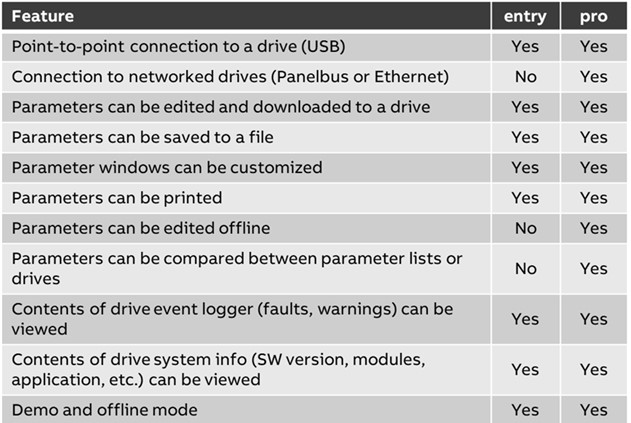
 There are 2 versions of Drive Composer, Entry and Professional (Pro)

Entry vs Pro
2. Drive Studio

DriveStudio is an easy to use software tool designed for use throughout a drive’s life cycle from startup, monitoring, to performance tuning. DriveStudio’s configuration wizards simplify drive commissioning and configuration. DriveStudio is designed for use with ABB high performance machinery drives, ACSM1, and ABB industrial drive modules, ACQ810.
Highlights
- Set, view, compare, and save parameters
- View listing of last changed parameters
- Configuration wizards for easy commissioning
- Backup and restore
- Monitor signals graphically and numerically
- Control the drive from the PC
- View and clear faults
- Set triggers for data monitoring and collection
- Used throughout the drive’s life cycle
Download ABB’s Drive Studio flyer
For more help and advice on getting the best out of your ABB drives, please Ask Andrea! Email Andrea.McPherson@Sentridge.com